
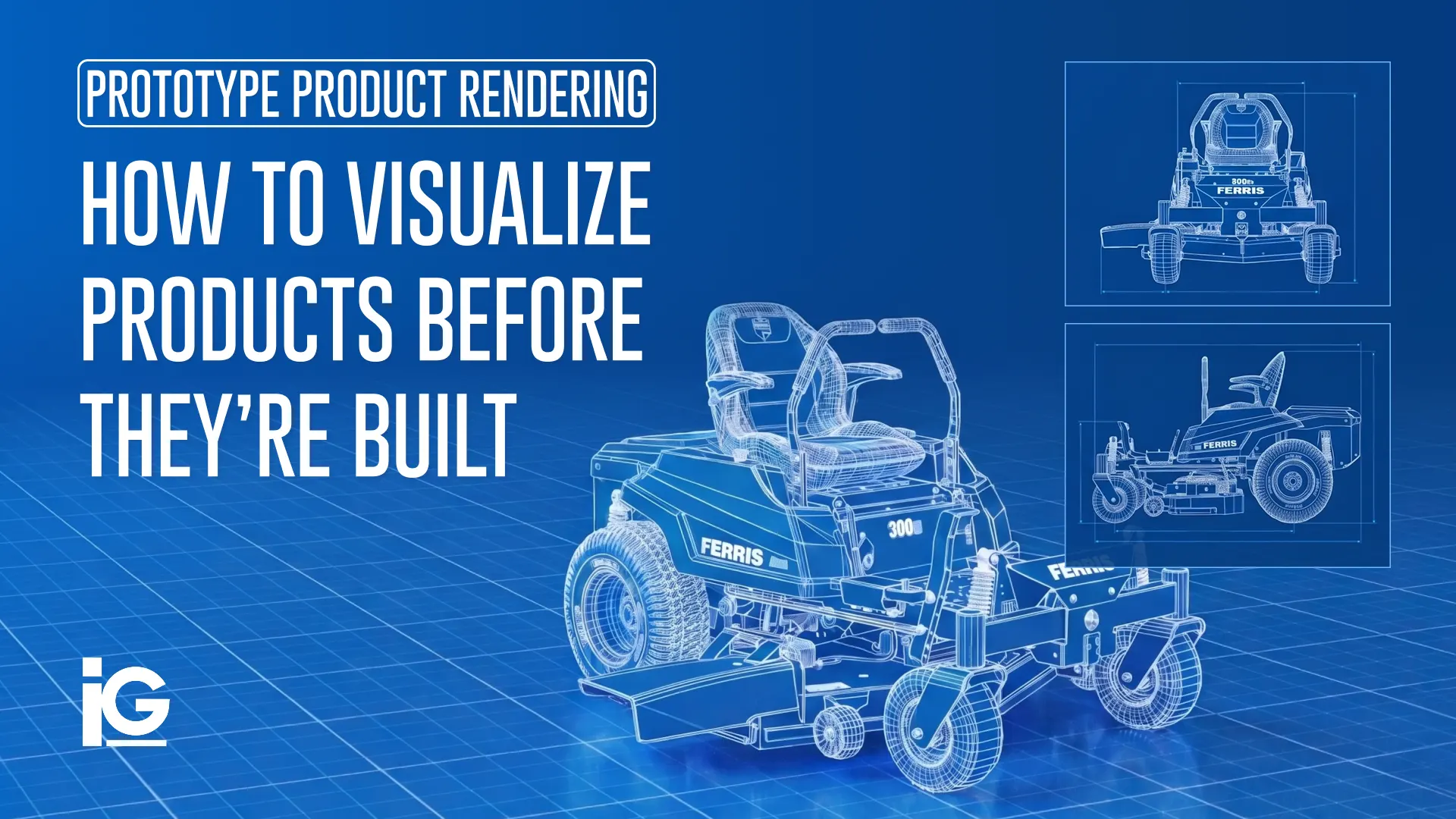
Waiting on physical prototypes can delay marketing, sales enablement, distributor communications, and product launches. In many cases, the product design is already finished, but the lack of a physical unit puts everything else on hold. The fastest way to close that gap isn’t a single deliverable but turning the CAD data you already have into a complete ecosystem of launch content, starting with prototype product rendering.
What Is Prototype Product Rendering?
Prototype product rendering creates a realistic digital image or animation of a product even before a physical prototype has been manufactured. Using CAD files, engineering drawings, or 3D models, product teams, engineering teams, and technical marketing teams produce photorealistic visuals that allow manufacturers to evaluate designs, secure approvals, and create marketing materials early in the product development process.
Unlike concept art, which explores ideas and possibilities, prototype product rendering is based on the actual design specifications of a product. For a broader look at how rendering fits alongside animation, interactive viewers, and technical illustration, our guide to technical product visualization covers the full category.
Here’s how prototype rendering compares to concept art and product photography:
| FEATURE | PROTOTYPE RENDERING | PRODUCT PHOTOGRAPHY | CONCEPT ART |
|---|---|---|---|
| Purpose | Visualize a product before it’s manufactured | Showcase a finished physical product | Explore ideas and potential design directions |
| Created From | CAD files, 3D models, engineering drawings, or detailed specifications | A physical product and camera equipment | Sketches, digital painting, or rough 3D concepts |
| Product Development Stage | Design and pre-production | Post-production or after manufacturing | Early ideation and brainstorming |
| Level of Accuracy | High; intended to accurately represent the final product | Exact representation of the finished product | Variable; focuses on creative exploration rather than precision |
| Can Show Realistic Materials and Finishes? | Yes | Yes | Sometimes, but realism is not always the goal |
| Requires a Physical Prototype | No | Yes | No |
| Common Uses | Design reviews, investor presentations, product launches, catalogs, trade shows, marketing assets | E-commerce listings, advertising, packaging, websites, catalogs | Brainstorming, industrial design, entertainment, early client presentations |
| Is it Easy to Revise | Yes, colors, materials, and design details can be updated digitally. | No, changes often require modifying the product and reshooting. | Yes, ideas can be changed quickly during exploration. |
| Best For | Pre-launch marketing, patents, packaging, and pitch decks | Final production units and in-hand lifestyle shots | Early ideation, mood boards, and pitching a direction before design is locked |
Do You Need It?
Prototype rendering delivers the greatest value whenever marketing, sales, or stakeholders need accurate visuals before manufacturing is complete, regardless of industry.
Here are the stages where prototype rendering is most useful:
Concept and Design Review
Early renders help internal stakeholders and leadership evaluate a direction before committing significant engineering time or manufacturing resources. They make it easier to discuss materials, finishes, proportions, and overall design using visuals that are far more realistic than CAD screenshots. The same CAD model reviewed here also powers installation content, animations, and interactive experiences—nothing goes to waste.
Design Freeze and Pre-Tooling
This is often the ideal time for prototype product rendering. By this stage, the product’s geometry is locked enough to render accurate visuals. At the same time, manufacturing hasn’t started, so design changes are still far less expensive than they would be later in production.
Tooling and Production Preparation
While tooling is in progress, marketing teams can begin producing brochures, dealer materials, websites, and trade show graphics using rendered images instead of waiting for finished samples. One of the greatest advantages of prototype rendering is that marketing no longer has to wait for production.
Post Product Launch
Once real product photography is available, renders are often kept in rotation for configurations, colorways, or markets where reshooting isn’t practical.
Regulatory, Distributor, and Executive Documentation
Renders also support use cases beyond marketing, including regulatory approvals, distributor sell sheets, and internal executive presentations. These involve audiences that often need accurate visuals even before the product exists.
📌 Rule of Thumb: If manufacturing is still months away but your team already needs accurate visuals, prototype product rendering is likely the right solution. High-quality renders give stakeholders a realistic representation of the product, making it easier to secure approvals, prepare marketing materials, and support sales conversations before manufacturing begins.
What Information is Needed to Create One?
The quality of a prototype product rendering depends on the information available. While every project is different, most start with a combination of the following:
CAD Files:
Native files or a neutral format like STEP, IGES, or STL provide the 3D geometry that serves as the foundation for the render.
Engineering Drawings (optional but helpful):
Technical drawings can clarify dimensions, tolerances, cross-sections, and design details that may not be immediately apparent from the 3D model alone.
Dimensions and Specifications:
Confirmed measurements so scale reads correctly, especially for products that will appear alongside other objects or people.
Material Information:
Details about the intended materials (aluminum, stainless steel, etc) so realistic surface properties are rendered correctly.
Surface Finishes:
Information about finishes (matte, gloss, powder-coated, anodized, textured) so visuals represent how the finished product will look under different lighting conditions.
Colors and Brand Standards:
Pantone, RAL, HEX, or RGB color values, along with brand guidelines, to ensure the rendered product matches the final design as closely as possible.
Branding Elements:
Logos, labels, decals, engravings, nameplates, or other graphics that will appear on the finished product.
Reference Images:
Photos of previous product versions, physical material samples, or comparable products can help clarify details that may not be fully defined in the CAD model or specifications.
Additional Views:
Exploded views, alternate configurations, and optional accessories are often part of a rendering project and are worth flagging early if you’ll need them.
The more complete your product information is at the start of the project, the fewer revisions are typically needed later. While a detailed CAD model is often enough to begin, additional information helps create a more accurate final render and reduces back-and-forth during the review process. This is also the same information that carries forward into animation, interactive viewers, and training content later on, so gathering it well up front pays off across the whole content ecosystem, not just the first render.
If your CAD model is still changing, it’s worth coordinating updates early, as frequent design revisions are one of the most common causes of rework. Our breakdown of CAD rendering pitfalls covers this in more detail.
Tip: You don’t need every item on this list before getting started. Many rendering projects begin with a well-developed CAD model, with materials, finishes, colors, and other details refined as the product design evolves.
How the Prototype Rendering Process Works
In most projects, the process begins with a CAD model or engineering data. The model is prepared for visualization, realistic materials and finishes are applied, and the product is placed in a scene with appropriate lighting. You’ll typically review draft renders before final images are delivered in the formats needed for web, print, presentations, or other marketing materials.
For the full breakdown of how this plays out on a real project, including how we handle CAD cleanup and revision rounds, see our rendering workflow for industrial equipment.
How Companies Use Prototype Product Rendering
Prototype product rendering is used well beyond design reviews. It helps teams communicate, market, and launch products long before manufacturing is complete. It also keeps the same visuals consistent across the website, brochures, distributor materials, sales presentations, trade shows, and interactive viewers.
Each of the moments below starts with the same CAD-based render. Each one is also a natural jumping-off point for animation, interactive experiences, or training content built from that same source file.
E-commerce and Pre-Order Pages
Consumer and B2B brands increasingly open pre-order or “coming soon” listings before manufacturing finishes. Renders make those listings look finished even when the product isn’t. The same render can then be adapted into a 360° interactive viewer for the product page, extending the listing’s shelf life well past launch day.
Investor and Crowdfunding Presentations
Investors and backers often need to evaluate a product before a working sample exists. High-quality renders help communicate the design more clearly than technical drawings or specifications alone. If your priority is pitching a room rather than publishing a product page, our guide to 3D animation for pre-market presentations covers that scenario specifically.
Packaging and Retail Design
Packaging design, shelf mockups, and retail signage often need to be finalized before a single unit rolls off the line. Renders let designers work from an accurate product image instead of a placeholder.
Patent and Intellectual Property Documentation
Patent applications and other intellectual property documentation often require precise technical visuals well before a physical unit exists. Renders provide the accurate, detailed imagery needed to support filings and protect a design.
Trade Show and Sales Presentations
Trade show graphics, dealer presentations, and sales materials are often developed months before manufacturing is complete. Prototype renders allow these projects to stay on schedule without waiting for finished products. Many teams pair the same render with a short animated loop for the booth screen, produced from the identical CAD source at the same time.
Internal Reviews and Approval
Engineering, marketing, product management, and leadership don’t always visualize a product in the same way. A realistic render gives every team a shared reference, making design discussions and approvals more productive.
Product Launch Campaigns and Dealer Training
Prototype renders also anchor multi-channel launch campaigns, dealer and distributor training materials, and sales enablement content. These are often paired with interactive 3D viewers that let prospects and dealers explore the product from every angle before a physical unit is available.
Once a product is in market and photography becomes available, many of these same use cases carry over into ongoing content needs like catalog and product page imagery. They can be updated for new product configurations, reused across catalogs and websites, or expanded into interactive product viewers that let customers explore the product from every angle.
Why Work With Info-Graphics for Prototype Product Rendering
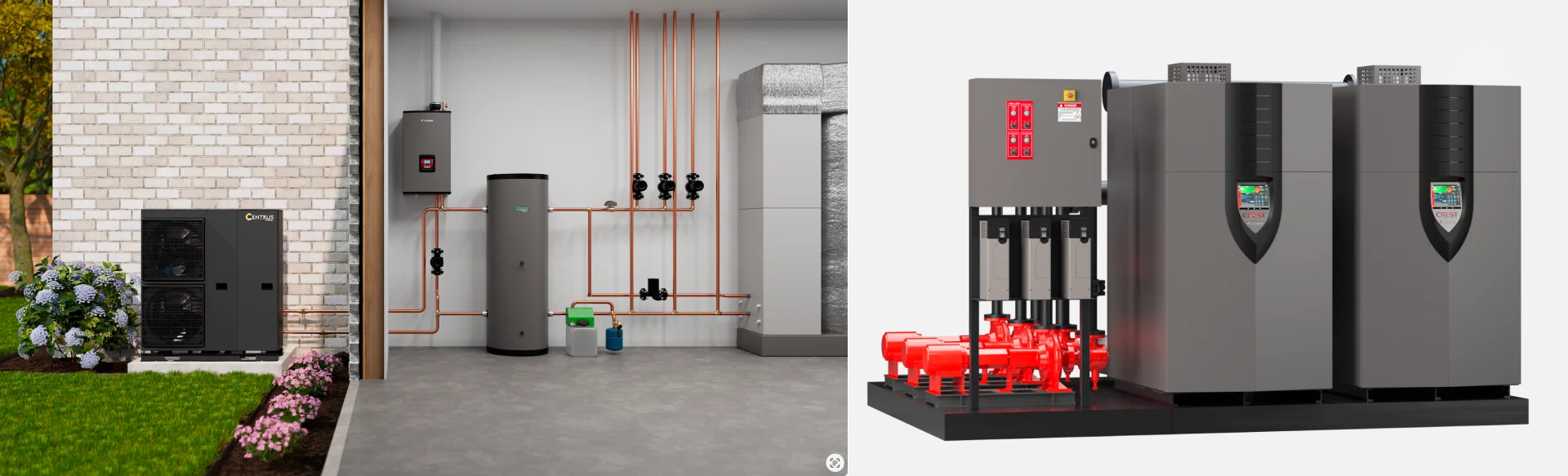
Prototype rendering is only as good as the team producing it. With 30 years of technical communication experience, Info-Graphics understands both the engineering and marketing sides of a product—turning a single CAD file into a full library of launch-ready content without losing accuracy along the way.
At Info-Graphics, we:
Work directly from your engineering data:
Most creative teams treat CAD as something to be handed off and translated. We treat it as the source material itself. That’s why revisions stay fast, and accuracy stays high even as designs change late in development. This keeps engineering and marketing working from the same source of truth throughout the project.
Start with rendering and expand:
Turn one CAD model into an entire library of technical content. The same engineering asset used for photorealistic renders can also power animations, installation instructions, interactive product experiences, e-learning, and technical sales content—creating greater ROI from work your engineering team has already completed.
Draw out 30 years of getting the technical details right:
We understand that accuracy is the difference between a render that holds up under an engineering review and one that gets sent back with corrections. That track record is also why our clients have historically seen fewer returns and lower support costs — the marketing accurately represents what the customer actually receives.
Work as an extension of your team:
There’s no retainer, no long-term contract — just project-based work scoped to what you need, when you need it. For teams without a full in-house 3D or technical content function, that means getting senior-level rendering and content expertise without adding headcount.
If your CAD is sitting idle post-design, there’s likely more content in it than you’re currently using.
Ready to launch faster? Discover how Info-Graphics transforms engineering CAD into photorealistic renders, animations, interactive experiences, and technical content that accelerates product launches and improves customer understanding.
Frequently Asked Questions
1. What is prototype product rendering?
Prototype product rendering is a photorealistic digital visualization of a product, created from CAD or engineering data before manufacturing begins. Unlike concept art, it reflects the actual design specifications, giving manufacturers launch-ready marketing, sales, and training visuals months ahead of physical production.
2. Can you render a product that hasn’t been built yet?
Yes, as long as CAD or engineering surface data exists for the product, a render can be produced without a physical unit. Most information doesn’t need to be final for early concept reviews, but it’s still better to lock in CAD designs if the render is for marketing purposes.
3. How accurate is a prototype render compared to the finished product?
Renders are built from the same CAD the product will be manufactured on, so dimensions and proportions are accurate. However, it may differ in how the product finish or material is presented since some CAD files may not include that information. To ensure a high level of accuracy, it is advisable to include finish specs, swatches, or materials information.
4. Can a rendered visual replace a physical prototype entirely?
Not really, especially for engineering purposes. Physical prototypes are still needed to validate fit, tolerances, ergonomics, and how a product performs or feels in use. Rendering replaces the need for a physical unit specifically for visual and marketing purposes. For example, a rendered product can appear on a trade show booth graphic, a pre-order landing page, or a dealer sell sheet months before a physical unit exists.
5. How long does prototype rendering take?
Timelines may vary depending on the product’s complexity. Usually, a single hero render can take one to three weeks from CAD handoff to final production of the visuals. Exact turnaround depends on how many assets you need and how far along your CAD is. You can talk to our team at Info-Graphics about your launch date, and we’ll map out a realistic timeline for you.
6. What file formats are needed to start?
Native CAD files or neutral formats like STEP, IGES, or STL are standard. The cleaner the surfacing, the less prep time is needed before rendering can begin.




Leave A Comment